```html
Mastering Map Scale on Your TESTPLAY 3D Ski Map: Plan Safer, Navigate Smarter
Introduction: Unlock the Power of Your TESTPLAY 3D Map
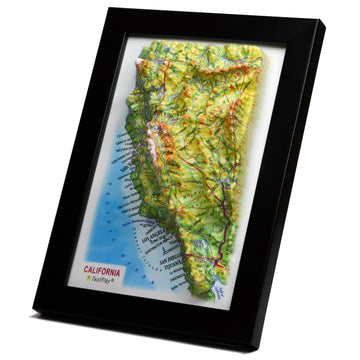
Your TESTPLAY 3D Ski Map is an incredible tool, providing a vivid and intuitive visualization of the mountain landscape. It transforms complex terrain into an easily digestible format, helping you see the mountain like never before.
However, to truly leverage its power for planning, navigation, and safety, you need to understand one fundamental concept: map scale. Scale is the key that connects the detailed representation on your screen or paper to the vast, real-world environment of the ski resort.
Without a solid grasp of scale, distances can be misjudged, routes miscalculated, and your sense of location on the mountain can be compromised. This comprehensive guide is designed to demystify map scale specifically for your TESTPLAY 3D Ski Map, equipping you with the knowledge to use it effectively and confidently on every adventure.
What is Map Scale? The Foundation of Understanding Maps
At its core, map scale represents the relationship between a distance measured on the map and the corresponding distance on the ground. It's the ratio that tells you how much the real world has been shrunk down to fit onto your map.
Think of it like a miniature model of a car; the model is a scaled-down version of the real thing, where every inch on the model represents a specific number of feet or yards on the actual car.
Similarly, map scale tells you that one inch or one centimeter on the map corresponds to a much larger distance in the actual terrain. Understanding this relationship is crucial for interpreting any map accurately, whether it's a flat topographic map or a dynamic 3D visualization like your TESTPLAY map.
Types of Scale Representation
Map scale is typically expressed in a few different ways, all communicating the same essential information. Recognizing these formats on your TESTPLAY 3D map is the first step to utilizing its scale effectively.
The two most common types you will encounter are the ratio scale and the graphic or bar scale. Familiarity with both will ensure you can always determine the scale, regardless of how it's presented.
Ratio Scale
A ratio scale is expressed as a fraction or a ratio, like 1:24,000 or 1/24,000. This means that one unit of measurement on the map represents 24,000 of the *same* units on the ground.
For example, if the scale is 1:24,000, then one inch on the map equals 24,000 inches on the ground. Crucially, one centimeter on the map would equal 24,000 centimeters on the ground, and one foot on the map would equal 24,000 feet on the ground.
This format is unit-independent, meaning you can use any unit you prefer as long as you apply it consistently. To convert 24,000 inches into a more understandable distance like feet or miles, you would perform a simple conversion (24,000 inches / 12 inches/foot = 2,000 feet; 2,000 feet / 5,280 feet/mile approx 0.38 miles).
Graphic or Bar Scale
The graphic scale, often called a bar scale, is a visual representation of the scale. It looks like a ruler or a segmented line printed directly on the map.
This bar is marked with distances, showing you exactly how long a certain measurement on the map corresponds to in real-world units like feet, meters, or miles.
For instance, a bar scale might show a one-inch segment labeled "500 feet," indicating that any one-inch measurement on the map represents 500 feet on the ground. The major advantage of a graphic scale, especially on digital maps like your TESTPLAY 3D map, is that it remains accurate even if you zoom in or out, provided the bar scale itself scales with the map view.
While the ratio might change as you zoom on a digital map, the graphic scale visually adjusts, always showing you the correct ground distance for a given map length at that specific zoom level. This makes the bar scale an exceptionally reliable tool for quick distance estimation on dynamic maps.
Why Understanding Scale is Essential for Skiers and Snowboarders
Understanding map scale is far more than just an academic exercise; it's a practical necessity that directly impacts your mountain experience. For skiers and snowboarders navigating a resort, scale provides the critical context needed to make informed decisions about their day.
It helps transform abstract lines and shapes on a map into tangible distances and realistic expectations about the terrain and time required to travel through it.
Whether you are planning your route down a challenging run, deciding if you have enough time to reach a different peak before lifts close, or trying to figure out how far away the base lodge is in changing weather, scale is your essential guide.
Estimating Distances on the Slopes
Knowing the scale allows you to estimate the actual length of runs, traverses, or the distance between two points on the map. Is that connecting trail a short connector or a long, flat skate?
How far is it from the top of the lift to the start of your desired run? How long is the run itself in terms of horizontal distance?
Accurately estimating these distances helps you manage your energy levels and choose trails that match your physical condition and time availability. Underestimating distances can lead to exhaustion, while overestimating might make you unnecessarily avoid enjoyable terrain.
Planning Routes and Timelines
Beyond just individual distances, scale empowers you to plan entire routes and estimate how long they will take. By measuring the combined length of different runs and lifts using the map scale, you can get a realistic sense of your itinerary.
Consider the time it takes to ski a certain distance, factoring in slope angle, snow conditions, your skill level, and potential lift lines.
This informed planning prevents rushing, helps you meet up with friends on time, and ensures you can comfortably fit everything you want to do into your day without being caught out as lifts close.
Safety and Navigational Accuracy
In the dynamic and sometimes challenging mountain environment, accurate navigation is paramount for safety. Whiteout conditions, unexpected closures, or injuries can quickly turn a fun day into a serious situation.
Understanding map scale allows you to pinpoint your location more accurately relative to key safety points like patrol huts, aid stations, designated meeting spots, or the base area.
If you know the scale, you can estimate the distance to the nearest point of help or plan the shortest route to safety. It significantly reduces the risk of becoming disoriented or undertaking journeys that are longer or more difficult than you initially perceived.
Scale on Your TESTPLAY 3D Ski Map: A Unique Perspective
Your TESTPLAY 3D Ski Map offers a visually stunning and intuitive experience, bringing the mountain to life with realistic contours and elevations. However, the very nature of 3D visualization introduces unique considerations when it comes to understanding and using map scale.
While traditional 2D maps have a consistent scale across the entire map (unless otherwise noted), the perspective view inherent in many 3D representations can sometimes lead to visual misinterpretations of distance.
It's essential to understand how this perspective impacts your perception of scale and how to rely on the tools provided on the map to stay accurate.
How 3D Visualization Impacts Scale Perception
The human brain is wired to interpret perspective in 3D space, and your TESTPLAY map leverages this to create a sense of depth and realism. Objects that appear further away in the 3D view look smaller, and objects that are closer appear larger, just as they do in real life.
While this enhances usability and intuition for visualizing terrain, it can be deceptive when trying to judge absolute distances directly from the visual representation alone.
A run stretching away from your viewpoint might look shorter than a run of the same length viewed perpendicular to your line of sight. Similarly, features in the foreground might appear disproportionately large compared to distant ones, potentially making distances in the foreground seem longer than they are.
Understanding Distortion and Perspective
The apparent distortion of scale in a perspective 3D view is a natural consequence of how 3D graphics work to simulate reality. Areas closer to the virtual camera appear larger relative to the actual scale, while areas further away appear smaller.
This means that simply measuring the length of a feature on your screen with a ruler will *not* give you a consistent representation of real-world distance across the entire map view.
The amount of foreshortening and apparent compression of distances increases the further elements are from the viewpoint. This is a critical point: while the *underlying geographic data* your TESTPLAY map uses is based on accurate scale, the *visual display* in a perspective 3D view introduces distortions based on the viewing angle.
Locating and Using the Scale Bar on Your TESTPLAY Map
Given the potential for visual distortion in the perspective 3D view, the most reliable tool for determining distance on your TESTPLAY map is the graphic or bar scale. TESTPLAY maps are designed with usability in mind, and they include an accurate bar scale that adjusts dynamically as you zoom and pan.
This bar scale provides the ground truth for scale at the specific zoom level and orientation you are currently viewing.
Look for the bar scale displayed prominently on your map interface. It will show a line segment corresponding to a specific distance on the ground (e.g., 500 feet, 200 meters). *Always* refer to this bar scale when you need to accurately estimate or measure a distance, rather than trying to judge distances solely by how they appear in the perspective view. The bar scale is your constant reference point for accurate measurement.
Practical Applications: Using Scale on Your TESTPLAY Map
Now that you understand what map scale is and how it behaves on your 3D map, let's put this knowledge into practice. Using the scale bar on your TESTPLAY map is a straightforward process that will significantly enhance your ability to plan and navigate.
Whether you are trying to figure out the length of a single trail or the cumulative distance of a series of connections, mastering these practical steps is key.
These techniques apply whether you are using a digital version of the TESTPLAY map on a device or potentially a printed version derived from the 3D model.
Step-by-Step: Measuring Distances
Estimating distances on your TESTPLAY map using the bar scale is a simple technique. Here’s how you can do it effectively:
1. Identify the Bar Scale: Locate the graphic bar scale on your TESTPLAY 3D map interface. Note the length of the bar and the real-world distance it represents (e.g., 500 feet, 1 kilometer).
2. Visually Compare or Use a Tool: For quick estimates, visually compare the distance you want to measure on the map (e.g., the length of a ski run segment, the distance between two points of interest) against the length of the bar scale. Does the feature look about as long as the bar scale? Half as long? Twice as long?
3. Refine Estimates: If the feature you are measuring is longer than the bar scale, see how many times the bar scale length fits along the feature. If it's shorter, estimate what fraction of the bar scale length the feature represents.
4. Use Digital Measurement Tools (If Available): Many digital map platforms, including potentially advanced versions of TESTPLAY, offer built-in measurement tools. If your TESTPLAY map version has a measurement tool, use it for the most accurate results. This tool will directly calculate the real-world distance based on the underlying scaled data.
Calculating Real-World Distances from Map Measurements
While visual estimation using the bar scale is great for quick checks, you can get more precise by performing a simple calculation if needed, especially when using a printed version or if you are very precise with your visual comparisons. This relies directly on the relationship shown by the bar scale.
Here's the calculation process, assuming you have compared a map distance to the bar scale:
1. Determine the Ratio from the Bar Scale: The bar scale gives you a direct ratio. For example, if a 1-inch segment of the bar scale is marked as representing 500 feet, the ratio is 1 inch on map = 500 feet on ground.
2. Measure the Map Distance: Use a ruler or make a careful visual estimation of the distance on the map you want to convert. Let's say the ski run you are interested in measures 3 inches on the map.
3. Perform the Calculation: Multiply your map measurement by the real-world distance represented by one unit on the bar scale. Using our example: 3 inches (map distance) * 500 feet/inch (scale ratio from bar) = 1500 feet (real-world distance).
4. Apply to TESTPLAY 3D: When using the dynamic bar scale on a digital TESTPLAY map, the calculation is often simpler. The bar scale visually tells you that *this specific length* on your screen currently represents *that specific ground distance*. By comparing features to the dynamically resizing bar, you are effectively performing this calculation visually or using the map's internal calculations if a tool is available.
Using Scale to Estimate Travel Time
Estimating distance using map scale is directly applicable to estimating travel time on the mountain. Once you have a distance estimate, you can combine it with your knowledge of typical speeds on skis or a snowboard.
Travel speed on the mountain is highly variable, depending on factors like the steepness of the slope, snow conditions (powder is slower than groomed corduroy), the presence of moguls or obstacles, your personal skill and fitness level, and whether you are traversing, skiing downhill, or moving on flatter sections.
A general rule of thumb might be useful for long traverses, but for downhill sections, speed varies dramatically. Use the scale to determine the horizontal distance of a run, then consider the vertical drop (using contour lines or stated statistics) and the factors mentioned above to make an educated guess about the time it will take.
For example, knowing a traverse is 1 mile long on relatively flat terrain based on your scale measurement means you might estimate 20-30 minutes depending on how much skating or poling is required. Knowing a steep downhill run is 0.5 miles long suggests a much shorter time, maybe 5-10 minutes, depending on conditions and how fast you ski it.
Scale and the Vertical Dimension on TESTPLAY 3D
While map scale primarily refers to horizontal distance, the vertical dimension is obviously critical in skiing and snowboarding. Your TESTPLAY 3D map excels at visualizing elevation changes, and understanding how horizontal scale relates to this vertical information is important.
Standard map scale bars represent horizontal distance. Even though the TESTPLAY map shows impressive vertical relief, the bar scale is your measure for distance *across the ground*, not straight up or down the slope face itself (unless specifically noted otherwise, which is rare for standard ski maps).
The relationship between horizontal distance and vertical change is what creates slope angle, and understanding scale helps you interpret this relationship from other map features.
Relating Horizontal Scale to Vertical Rise
Features like contour lines on a map show lines of equal elevation. The closer contour lines are horizontally, the steeper the terrain. The horizontal distance between contour lines is measured using the horizontal scale.
For example, if your scale bar shows 500 feet, and you see several contour lines spaced very closely together within that 500-foot horizontal distance, you know there is a significant vertical gain or loss over that short horizontal span, indicating steep terrain.
Conversely, if contour lines are far apart horizontally, the slope is gradual. While the TESTPLAY 3D view visually represents steepness, using the horizontal scale in conjunction with contour lines (which may be optionally displayed or implicit in the 3D model) allows you to quantify that steepness in terms of vertical change over horizontal distance.
Slope Angle and Scale
Directly measuring slope angle from a standard horizontal map scale isn't possible without additional information like the vertical interval of contour lines. However, your understanding of horizontal scale informs your interpretation of steepness visually represented on the TESTPLAY 3D map or indicated by contour line spacing.
A run that appears very steep in the 3D view might cover a relatively short horizontal distance compared to a less steep run. Using the scale to measure the horizontal run length helps you understand the *extent* of that steepness over the ground.
TESTPLAY maps often include slope difficulty ratings (green, blue, black), which are derived from slope angle, but understanding the scale helps you appreciate the actual ground covered by a run of a certain difficulty.
Scale in Decision Making on the Mountain
Integrating your knowledge of map scale into your real-time decision-making process on the mountain can significantly improve your experience and safety. It allows you to move beyond simply following signs to truly understanding the layout and distances of the resort.
Every decision about where to go next, which lift to take, or what run to ski can be informed by a better understanding of the distances involved.
Using scale makes you a more competent and self-reliant navigator on the slopes.
Choosing Appropriate Trails
Scale helps you assess the length of potential runs. Are you looking for a long cruiser to warm up? Use the scale to find trails that cover significant horizontal distance.
Do you want a short, steep challenge? Look for runs that cover a shorter horizontal distance but have a large vertical drop (which you'd infer from the visual 3D steepness and potentially contour line density if visible or mentally referenced).
Combining length from scale with perceived or indicated steepness from the 3D view or trail ratings allows you to select trails that match your energy levels and desires.
Planning Emergency Routes or Rendezvous Points
In case of an emergency, sudden weather change, or getting separated from your group, knowing distances is vital. Use the scale on your TESTPLAY map to identify the nearest patrol station, warming hut, or easy bailout run to the base area.
Estimate the distance to these safe points to gauge how long it would take to reach them.
Planning rendezvous points with friends? Use the map scale to understand the travel time and distance required to get from different parts of the mountain to your agreed-upon spot.
Avoiding Hazards Based on Distance Estimates
TESTPLAY maps often mark hazards, closures, or out-of-bounds areas. Using the scale allows you to understand how far away these features are from your current or planned location.
You can ensure you maintain a safe distance from cornice edges, cliffs, or avalanche-prone areas if marked.
Understanding the scale of the terrain helps reinforce the importance of marked boundaries and warnings.
Common Pitfalls and Tips for Using Scale on 3D Maps
While TESTPLAY 3D maps are incredibly intuitive, the very features that make them visually appealing can sometimes lead to common misunderstandings regarding scale. Being aware of these potential pitfalls will help you use your map more effectively and avoid errors.
The key is to appreciate the difference between the *perceived* distance in a perspective view and the *actual* distance represented by the reliable bar scale.
Always prioritize the objective information provided by the scale bar and other map features over visual appearance alone.
The Illusion of Proximity in 3D
As mentioned earlier, perspective can make distant objects appear closer than they are in terms of horizontal ground distance. A lodge far across a valley might seem relatively near because it's clearly visible in the 3D view.
However, using the bar scale to measure the horizontal distance across that valley might reveal a much longer traverse or journey than you visually estimated.
Always double-check significant distances with the bar scale, especially when traversing large open areas or heading towards features that are far from your current viewpoint.
Variable Scale in Perspective Views
In a true perspective projection used for realistic 3D views, the scale is not constant across the entire image. Features closer to the viewpoint are rendered at a larger scale than features further away.
This variable scale is what creates the sense of depth but means that measuring distances directly on the screen without using the dynamic bar scale will yield inconsistent results depending on where on the map the measurement is taken.
Rely exclusively on the dynamically scaling bar scale or any built-in measurement tools your TESTPLAY map provides, as these are calibrated to the underlying geographic data and correct for the visual perspective distortion.
Always Cross-Reference with Other Information
Map scale is just one piece of the puzzle when it comes to mountain navigation. Do not rely solely on scale to make decisions.
Cross-reference the distances you estimate with other information on the map, such as trail markers, lift locations, named peaks, contour lines, and GPS location if you have it.
Use scale in conjunction with these features to build a complete and accurate picture of your location and the surrounding terrain. For instance, confirm your scale-based distance estimate to a junction marker by identifying the marker itself on the map and on the ground.
Integrating Scale with Other TESTPLAY 3D Features
Your TESTPLAY 3D Ski Map is a rich source of information, and map scale works in concert with its other features to give you a comprehensive understanding of the resort. Effectively combining scale information with symbols, labels, and trail data enhances your ability to plan and navigate.
Scale provides the spatial context for all the other information presented on the map.
Understanding the distances between different features helps you connect them logically in your mind and on the mountain.
Trail Markings and Scale
Trail difficulty ratings, names, and numbers are overlaid on the TESTPLAY map. Use the map scale to understand the length of trails or sections with specific ratings.
Knowing the distance allows you to appreciate the duration of a challenging section or the extent of an easy green run.
You can also use scale to estimate the distance between trail junctions or markers, helping you track your progress along a run.
Points of Interest and Distances
TESTPLAY maps often highlight key points of interest such as lodges, restaurants, restrooms, first aid stations, scenic overlooks, or terrain parks. Using the map scale, you can quickly estimate the distance to these important facilities.
This is invaluable for planning breaks, meeting up with others, or accessing services.
Knowing the distance to the nearest warming hut on a cold day can be just as important as knowing the length of the next ski run.
Conclusion: Ski Smarter with Scale on Your TESTPLAY 3D Map
Your TESTPLAY 3D Ski Map is a powerful visualization tool, bringing the mountain to life with stunning realism. However, to use it to its full potential for safe and efficient navigation, mastering the concept of map scale is indispensable.
Scale is the bridge between the detailed representation on your map and the actual distances and sizes in the real world. It allows you to move beyond just recognizing features to accurately measuring and estimating distances.
By consistently using the bar scale on your TESTPLAY map, understanding how perspective affects visual perception, and integrating scale knowledge with other map features, you gain a crucial advantage.
You can plan your days more effectively, make better decisions about which runs to ski, accurately estimate travel times, and significantly enhance your safety on the mountain. Practice using the scale on your map, relate it to the terrain you see around you, and you will unlock a deeper understanding and appreciation for the ski resort. Ski smarter, navigate more confidently, and fully enjoy your time on the slopes with the power of map scale and your TESTPLAY 3D Ski Map.
```