```html
---
**Meta Title:** TESTPLAY 3D Maps: Boost Your Ski Trip Planning!
---
# Plan Your Next Ski Trip: How TESTPLAY 3D Maps Boost Planning
Hey fellow snow enthusiasts! Dreaming of hitting the slopes but feeling a little overwhelmed by the planning process? You're not alone.
Juggling trail maps, resort guides, and trying to visualize the actual mountain terrain from a flat 2D image can be tricky. It is tough to gauge the *real* steepness of that black diamond or figure out the quickest way from the lodge to your favorite lift.
For years, skiers and snowboarders have relied on paper maps or their digital equivalents, which, while essential, have inherent limitations when it comes to truly understanding the three-dimensional nature of a mountain. How do you predict where the sun will hit, or how a series of moguls flows down a run, or the elevation gain on a traverse?
These traditional tools provide a top-down perspective that simplifies the complex geography into lines and shapes, often leaving much to the imagination and relying heavily on colored labels that mean different things at different resorts.
But what if you could get a true feel for the resort *before* you even pack your bags? Imagine virtually exploring every run, lift, and facility in stunning detail, experiencing the mountain in a way that mimics being there.
Picture yourself gliding virtually down a slope, seeing the terrain unfold beneath you, understanding the curvature and the changes in pitch just as you would in person.
That is where TESTPLAY 3D Maps come in. This revolutionary tool is set to transform the way you plan your ski adventures, making it easier, more informed, and way more exciting.
By providing an immersive, realistic view of ski resorts, TESTPLAY bridges the gap between abstract map representations and the tangible reality of the mountain. It is not just a map; it is a pre-trip exploration experience.
Let us dive into how TESTPLAY 3D Maps can be your ultimate ski trip planning partner and help you maximize your time on the snow.
## The Classic Challenges of Ski Trip Planning
Planning a ski trip involves more than just booking flights and accommodation. It requires understanding the destination itself – the mountain, its layout, and its offerings.
Traditionally, this understanding comes from studying static 2D maps and reading descriptions, methods that come with their own set of frustrations and limitations. Let us look at some of the common hurdles skiers face during the planning phase.
### Flat Maps Tell Only Half the Story
The most fundamental tool for ski trip planning and on-mountain navigation has always been the trail map. Whether printed on waterproof paper or displayed on a phone screen, these maps are indispensable. However, they represent a three-dimensional landscape in two dimensions, which inherently loses crucial information.
#### Difficulty visualizing elevation changes and actual steepness.
A blue square run on a flat map looks... flat. You see the line snake down the mountain, perhaps with some contour lines if the map is detailed enough, but it is incredibly hard to tell just how steep that initial pitch is or if there is a sudden drop-off around a corner.
This lack of realistic elevation representation means skiers often misjudge runs, leading to surprises – sometimes unpleasant ones – on the mountain. What looks like a gentle slope could turn out to be a leg-burner, and what looks intimidatingly steep might be manageable with the right approach.
#### Misjudging trail difficulty based solely on color coding.
While trail difficulty ratings (green, blue, black, double black) provide a general guideline, they are subjective and can vary significantly from one resort to another. A blue run at a smaller, local hill might be equivalent to a green run at a major mountain resort, and vice versa.
Relying *only* on color coding without understanding the actual terrain profile shown by a 3D map can lead to beginners accidentally ending up on difficult runs or advanced skiers missing out on challenging terrain they would have enjoyed.
#### Hard to truly grasp the scale and layout of a large resort.
Zooming out on a 2D map of a vast resort gives you the overall picture, but it flattens perspective. It is hard to tell how far apart different base areas are, how long a specific traverse might feel, or the actual vertical drop covered by a series of connected runs.
Understanding the spatial relationship between different lifts and areas is crucial for efficient planning, but it is something flat maps struggle to convey effectively.
### Juggling Information Overload
Beyond the trail map, planning a ski trip involves gathering information from numerous sources – the resort website, accommodation booking sites, weather forecasts, snow reports, restaurant reviews, and more.
Synthesizing all this information and applying it to the map adds another layer of complexity.
#### Piecing together details from various websites and maps.
You might find a description of a great restaurant on the resort website, but then have to switch back to the map to try and figure out where it is located relative to the slopes or your accommodation.
Information about lift operating times, trail closures, or special events is often separate from the map itself, requiring constant switching between different platforms and views.
#### Efficiently locating key facilities like restrooms, restaurants, or rental shops.
Finding essential facilities on a flat map can sometimes feel like a treasure hunt. While major points of interest might be labeled, their exact location and surrounding terrain context are hard to grasp.
Imagine needing to find the nearest restroom quickly when you are halfway down a long run, or trying to guide a group to a specific restaurant for lunch. A 2D symbol on a map does not provide the visual landmark cues that a 3D view can.
### Uncertainty and Potential for Getting Lost
For many skiers, especially those visiting a resort for the first time, there is an underlying anxiety about navigating unfamiliar terrain.
This is amplified by the limitations of traditional maps and the sheer scale of some mountain resorts.
#### Worrying about accidentally ending up on a run beyond your skill level.
This is a common fear, particularly for intermediate skiers venturing onto black diamonds or beginners straying onto blue runs. Misinterpreting the map's representation of difficulty or taking a wrong turn can lead to uncomfortable situations, or even accidents.
Knowing what a run *looks* like before you commit to it can significantly reduce this anxiety.
#### Feeling less confident navigating an unfamiliar mountain.
The first day at a new resort can feel daunting. Where do you start? Which lift should you take? How do you get back to the base area? Without a clear mental model of the mountain's layout, it is easy to feel disoriented.
This lack of confidence can detract from the enjoyment of the trip, making skiers stick to easier, more familiar runs instead of exploring the full potential of the resort.
These challenges highlight the need for a more intuitive, comprehensive, and realistic planning tool.
Enter TESTPLAY 3D Maps.
## Introducing TESTPLAY 3D Maps: Your Pre-Ski Visualizer
Imagine lifting the ski resort off the flat page or screen and holding it in your hand, rotating it, zooming in on specific areas, and seeing the mountain come to life with realistic detail.
That is the power of TESTPLAY 3D Maps. It is a fundamental shift in how we interact with resort information during the planning phase.
### What Exactly Are TESTPLAY 3D Maps?
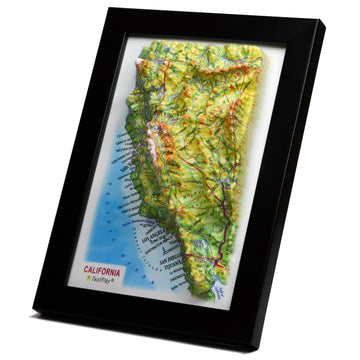
At their core, TESTPLAY 3D Maps are sophisticated, interactive digital models of ski resorts. They are built using advanced mapping technology, often incorporating high-resolution aerial imagery and terrain data to create incredibly accurate and visually stunning representations of the mountain landscape.
#### Explain the core concept: Interactive, high-fidelity 3D renderings of ski resorts.
Unlike static 2D images, TESTPLAY maps allow you to navigate the resort space fluidly. You can pan across vast areas, rotate the perspective to see slopes from different angles, and zoom in closely to examine specific features like trail junctions, lift queues, or building entrances.
The fidelity of the rendering means that the terrain looks much like it does in real life, with visible dips, bumps, bowls, and ridges accurately depicted.
#### Mention the goal: Providing a realistic, immersive view for planning and navigation.
The primary objective of TESTPLAY is to eliminate the guesswork involved in interpreting abstract maps. By presenting the mountain in a format that our brains are naturally wired to understand – three dimensions – it makes the planning process more intuitive and the outcome more predictable.
The immersive experience helps you build a mental map of the resort before you even arrive, reducing anxiety and increasing your confidence on the first day.
### More Than Just a Pretty Picture
While the visual appeal of a high-fidelity 3D model is undeniable, TESTPLAY is not just a digital art piece. It is a powerful planning tool because it integrates critical data directly into the realistic visual representation.
#### Highlight key data integrated into the 3D model (trail names, difficulty, lift locations, points of interest).
Overlaid on the detailed 3D terrain are all the essential pieces of information you need to plan your day. Trail names and their difficulty ratings are clearly labeled on the actual slopes. Lift lines are shown connecting terminals, often indicating lift types. Points of interest like lodges, restaurants, ski patrols, first aid stations, restrooms, and rental shops are pinpointed with icons.
This integration means you see the data *in context* – you see the restaurant located *on* the side of the slope or *next to* the specific lift you are considering.
#### Emphasize the realistic terrain representation.
This is perhaps the most significant advantage over 2D maps. The slopes are not just colored lines; they are rendered surfaces with accurate pitches and contours. You can visually compare the steepness of a black diamond to a blue square by simply looking at the angle of the slope in the 3D view.
This realistic representation is key to making informed decisions about which runs are suitable for your skill level and what kind of challenges a particular area of the mountain presents.
By combining stunning visuals with essential data, TESTPLAY 3D Maps transform resort planning from a deciphering exercise into an exploratory adventure.
## How TESTPLAY 3D Maps Revolutionize Your Planning Process
Now that we understand what TESTPLAY 3D Maps are, let us explore the tangible ways they can dramatically improve your ski trip planning experience. It is about moving from abstract comprehension to practical visualization.
### Master the Terrain Before You Go
This is where TESTPLAY truly shines compared to any flat map. Getting a feel for the mountain's topography is crucial for selecting appropriate runs and planning your day effectively.
#### See the actual pitch of slopes – gain a better understanding of difficulty ratings than ever before.
Stop guessing! With TESTPLAY, you can look directly at a run and see its angle relative to other runs. Compare a groomed green circle to a steep black diamond mogul field side-by-side in 3D. This visual comparison provides an understanding of difficulty that a color code alone cannot convey.
You can spot transitions in steepness within a single run, identify flat sections that might require skating, or see if a seemingly easy blue run has a surprising steep headwall.
#### Explore different areas of the resort and decide which best suit your group's skill levels.
Planning a trip with skiers of mixed abilities? TESTPLAY allows you to virtually tour different sections of the mountain. You can identify areas with clusters of green and blue runs suitable for beginners and intermediates, locate progression areas, and find the challenging black diamond and double black diamond zones for the experts.
This visual pre-assessment ensures that everyone in your group will have plenty of suitable terrain to enjoy, preventing the frustration of getting stuck in an area with runs that are too difficult or too easy.
#### Identify potential warm-up runs and challenging pistes.
Planning your first few runs is easy when you have a clear visual of the mountain. Identify wide, gentle slopes near the base for warming up. Then, transition to slightly more challenging runs, using TESTPLAY to preview their pitch and length. For advanced skiers, locating those challenging moguls or steep glades becomes a visual mission.
You can build a mental itinerary based on your goals for the day, confident in your understanding of the terrain you will encounter.
### Smart Route Planning
Getting around a large ski resort efficiently can be a challenge. Choosing the right lifts and connecting runs is key to maximizing your time on the snow and avoiding unnecessary travel.
#### Visualize lift connections and plan efficient routes across the mountain.
TESTPLAY makes it easy to see how lifts connect different areas and how runs feed into lift bases. You can plan multi-lift routes to get from one side of the resort to another, or visualize the quickest way from the top of one lift to the base of another.
Seeing the spatial layout in 3D helps you understand traffic flow and potential choke points, allowing you to plan routes that might help you avoid crowds during peak times.
#### Map out runs you want to tackle based on your pre-trip visual exploration.
After exploring the terrain virtually, you will have a list of runs you are excited to try. TESTPLAY allows you to piece these runs together into a logical flow for your day. Plan a morning attacking the steep north face, then a transition over to the sunny bowls for the afternoon, all based on your visual understanding of the connections.
You can save planned routes or mental itineraries, making your day on the mountain more structured and less reliant on on-the-spot map reading.
#### Estimate how long it might take to get from one side of the resort to another.
While actual travel time depends on factors like speed and lift lines, seeing the distance and elevation changes in 3D provides a much better estimate than a flat map. You can trace a route visually and get a realistic sense of the scale and complexity, helping you allocate time for different areas of the resort.
This is particularly useful when planning to meet up with others or ensuring you make it back to the base area in time.
### Easily Locate Key Facilities
Knowing where essential facilities are located is vital for comfort and safety during your ski day. TESTPLAY integrates these points of interest seamlessly into the 3D environment.
#### Quickly find lodges, restaurants, restrooms, first aid, rental shops, etc., on the interactive map.
No more hunting for tiny icons on a cluttered 2D map. In TESTPLAY, you can often see buildings rendered in 3D, with clear labels or icons indicating their function. Need a restroom? Zoom in on the lodge or the base of a lift and see its location visually. Looking for a quick bite? Restaurants and cafes are placed within their actual mountain context.
This immediate visual identification saves time and reduces frustration, especially when you are cold, tired, or in a hurry.
#### Plan convenient meeting points for groups.
When skiing with friends or family, designating easy-to-find meeting points is essential. With TESTPLAY, you can visually identify prominent landmarks, lift bases, or specific spots outside a lodge and agree on a meeting location that everyone can easily find on the 3D map.
You can even share specific locations or routes with others in your group who are also using the tool.
#### See the proximity of amenities to specific lifts or runs.
Planning to ski a certain area all morning? Use TESTPLAY to see which lodge, restaurant, or restroom is closest to the lifts and runs in that zone. This allows for efficient breaks and ensures you do not have to ski halfway across the mountain just to find a facility.
Understanding the layout of amenities relative to the slopes enhances your overall mountain experience.
### Choose the Perfect Resort (If Applicable)
If you are still in the process of selecting a destination for your ski trip, TESTPLAY can be an invaluable comparative tool.
#### Use TESTPLAY to visually compare the terrain and layout of different resorts you're considering.
Flat statistics about acreage, vertical drop, or number of runs only tell part of the story. By exploring multiple resorts in TESTPLAY's 3D environment, you can get a real feel for their character. Is one resort spread out and sprawling, while another is more vertically concentrated? Does one have wide-open bowls, while another is characterized by tree-lined trails?
This visual comparison allows you to choose a resort that truly aligns with the type of skiing experience you are seeking and the preferences of your group.
#### Ensure the resort has enough variety for everyone in your party.
Using the 3D view, you can easily identify the proportion and layout of green, blue, and black runs. Does the resort have ample beginner terrain separated from expert slopes, or do runs of different difficulties intertwine? Are there dedicated learning areas that look suitable?
Visually assessing the distribution of terrain difficulty helps confirm that the resort offers enough variety to keep everyone happy and challenged throughout the trip.
### Build Confidence and Enhance Safety
Feeling confident and safe on the mountain is paramount for an enjoyable ski trip. TESTPLAY contributes to both by providing unparalleled pre-trip familiarity.
#### Reduce the risk of accidentally heading down an overly challenging run.
Because you have a better understanding of run steepness and transitions from your 3D exploration, you are much less likely to take a wrong turn that leads you onto terrain beyond your ability. You can identify clear visual cues on the map that correspond to the actual mountain features.
This informed decision-making prevents stressful or potentially dangerous situations on the slopes.
#### Feel more comfortable and less likely to get disoriented on your first day.
Having spent time exploring the resort virtually in 3D, you will arrive with a strong mental map. You will recognize key landmarks, understand the general flow of the mountain, and know where the main lifts and base areas are located.
This pre-familiarity significantly reduces the feeling of being lost or overwhelmed, allowing you to jump straight into skiing with confidence and focus on enjoying the snow.
By leveraging the realistic visualization and integrated data of TESTPLAY 3D Maps, you transform the planning process from a source of potential anxiety into an exciting prelude to your mountain adventure.
## Getting Started with TESTPLAY 3D Maps for Your Trip
Adopting TESTPLAY into your ski trip planning workflow is straightforward and intuitive. It is designed to be user-friendly, allowing you to quickly access the information you need in a visually engaging format.
### Where to Access TESTPLAY
The availability and format of TESTPLAY maps will depend on the specific implementation.
#### Mention if it's an app, website, or integrated platform (adjust based on the actual product).
TESTPLAY might be a dedicated mobile application you download, a feature accessible directly through a resort's official website, or an integrated tool within a larger ski information platform. Check the TESTPLAY website or search your app store for "TESTPLAY 3D Maps" or "TESTPLAY ski resort maps" to find the relevant platform.
#### Quick steps on finding your desired resort within TESTPLAY.
Once you have accessed the platform, there is typically a search function or a browsable list of available resorts. Simply search for the name of the ski resort you are planning to visit. The map for that resort should load, allowing you to begin your 3D exploration. Ensure the map data is up-to-date for the current season if possible.
### Tips for Effective Use
To get the most out of TESTPLAY 3D Maps for your planning, spend some time familiarizing yourself with its features and using them strategically.
#### Spend time exploring different viewpoints and zooming levels.
Do not just look at the map from directly above. Pan, rotate, and tilt the view to see slopes from the side, from the bottom looking up, or from the top looking down. Zoom out to get a sense of the entire resort's scale, then zoom in closely to examine specific runs, lift queues, or facility entrances. Practice navigating the 3D space to make your exploration feel natural.
#### Utilize any layering options (e.g., showing trail names, marking points of interest).
Most 3D mapping tools offer options to toggle different layers of information. Make sure trail names, difficulty markers, lift lines, and points of interest are visible. Some platforms might allow you to add custom markers for planned meeting spots or runs you definitely want to try. Customize the view to suit your planning needs.
#### Practice "virtually skiing" down some runs to get a feel for them.
Select a run from the top and visually follow its path down the mountain in the 3D view. Pay attention to how the slope angle changes, where it curves, and where it intersects with other runs or lifts. This simulation helps you mentally prepare for the descent and anticipate the terrain.
#### Use it collaboratively if planning a trip with others.
If the platform supports it, share your screen or collaborate virtually with your fellow travelers. Discuss potential routes, show them the difficulty of runs you are considering, or point out meeting spots. Planning together using the immersive 3D view ensures everyone is on the same page and feels involved in the preparation.
*(Optional: H3: Combining Planning with Real-Time Updates)*
*(If TESTPLAY integrates real-time data like lift status, trail closures, or snow conditions, add a section here explaining how this layer of information enhances both planning and on-mountain decision-making. This could include features like seeing which lifts are open, which runs are groomed, or where avalanche control is in progress, allowing for dynamic planning adjustments.)*
Incorporating TESTPLAY into your pre-trip routine transforms planning from a chore into an exciting preview of your upcoming adventure.
## Conclusion: Plan Smarter, Ski Better
Planning a ski trip should be part of the fun, not a source of stress! The anticipation of hitting the slopes, exploring new terrain, and spending time in a beautiful mountain environment is what it is all about.
Traditional maps have their place, serving as foundational guides, but they simply cannot give you the immersive, realistic insight that TESTPLAY 3D Maps provide. They are excellent for general layout but fall short in conveying the crucial sense of slope angle, distance in elevation, and true spatial relationships.
By using TESTPLAY, you can conquer the terrain virtually, gaining a deep understanding of the mountain's layout and difficulty levels before you even arrive. You can plan your day efficiently, mapping out routes that maximize your time and energy. You can locate everything you need, from restaurants to restrooms to first aid, with ease and confidence within the realistic 3D environment.
This level of preparation allows you to arrive at the resort feeling confident and prepared, ready to make the most of every moment on the snow. It takes the guesswork out of navigating unfamiliar mountains and allows you to truly focus on the joy of skiing or snowboarding.
No more standing at a fork in the trail wondering if the black diamond ahead is truly within your limits. No more searching frantically for a meeting spot indicated only by a small symbol on a flat page.
TESTPLAY 3D Maps empower you to make informed decisions, explore with confidence, and spend less time figuring out where you are going and more time enjoying the ride.
Ready to visualize your perfect ski adventure and leave planning frustrations behind? Give TESTPLAY 3D Maps a try for your next trip and see how much smoother your planning – and your time on the slopes – can be! It is the future of ski resort planning, available today.
```