```html
Feel the Mountain: The Power of Tactile Maps in TESTPLAY Experiences
Maps have always been fundamental tools for navigation, planning, and understanding the world around us. From ancient cartography to modern digital interfaces, maps provide a visual representation of complex spatial information. However, relying solely on visual input can sometimes create a distance between the user and the environment being depicted. We see the terrain, but do we *feel* it? This is where the revolutionary concept of tactile maps, especially when integrated into a hands-on framework like TESTPLAY, offers a profound solution, transforming abstract data into a tangible, intuitive experience, particularly relevant for simulating challenging environments like mountains. This post delves into the limitations of traditional maps, introduces the power of tactile navigation, explores its unique synergy with TESTPLAY, details the craft of creating tactile landscapes, highlights the multifaceted benefits, applies these concepts to understanding mountainous terrain, and looks towards the exciting future of this innovative approach.
The Limitations of Conventional Mapping
For centuries, maps have primarily appealed to our sense of sight. This visual-centric approach has been incredibly effective for countless applications, providing overview, detail, and symbolic representation of geographic features. However, relying almost exclusively on vision inherently presents certain limitations when seeking a truly deep and intuitive understanding of complex landscapes, especially in dynamic or challenging scenarios.
The Visual Bias and Abstraction
Digital maps, while offering incredible detail and interactivity, often flatten our perception of terrain. Elevation is typically represented through contour lines, color gradients, or 3D models on a 2D screen. While these methods are informative, they require interpretation and don't immediately convey the *feel* of a steep slope or a rugged surface. The visual medium can make it easy to overlook subtle but critical details related to texture, gradient, or overall physical impedance that are crucial for navigation and planning in environments like mountains.
Lack of Physical Engagement
Traditional maps, whether printed or digital, offer a passive interaction. You look at them, you interpret symbols, and you plan based on that visual information. There is no physical engagement with the representation of the landscape itself. This lack of physical interaction can hinder the development of spatial reasoning and muscle memory associated with navigating actual terrain. The experience remains largely intellectual rather than visceral and intuitive.
Accessibility Gaps
Perhaps most significantly, purely visual maps are inherently inaccessible to individuals with visual impairments. While screen readers and alternative text can describe *elements* of a map, they struggle to convey the spatial relationships, textures, and overall structure of complex terrain effectively. Creating truly inclusive mapping experiences requires engaging senses beyond sight, opening up new avenues for understanding for a broader audience. The need for more accessible and inclusive tools is paramount in design and technology today.
Enter the Realm of Tactile Mapping
Tactile mapping represents a fundamental shift in how we interact with spatial data. Instead of just seeing the landscape, you can touch it, feel its contours, and understand its textures. This approach leverages our innate sense of touch, providing a rich, multi-sensory experience that can complement or even replace purely visual information. It bridges the gap between abstract representation and physical reality, making maps more intuitive and accessible.
What Defines a Tactile Map?
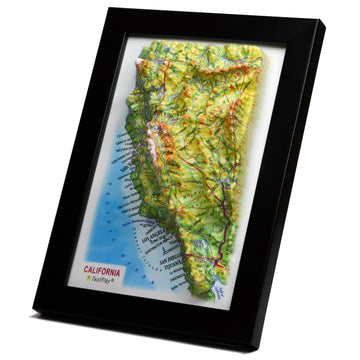
A tactile map is a physical representation of geographic or spatial information that is designed to be interpreted through touch. It uses variations in height, texture, shape, and potentially temperature or vibration to convey different features. Unlike traditional raised-relief maps which might only show elevation, a true tactile map aims to encode a wider range of information directly onto the physical surface. The goal is to allow a user to "read" the map with their fingertips, building a mental model based on haptic feedback.
More Than Just Relief
While elevation is a key component often represented through raised areas, tactile maps go much further. Different textures can denote various types of ground cover – smooth for water, rough for rocky areas, bumpy for forests. Shapes can represent buildings, landmarks, or obstacles. Lines with different patterns or thicknesses can indicate roads, trails, or boundaries. The careful selection and application of these tactile cues are essential for creating a map that is both informative and easily navigable by touch. The design process involves understanding how different textures and shapes are perceived by touch.
TESTPLAY: Putting Touch to the Test
The concept of TESTPLAY, in the context of game design, simulation, or user experience, involves actively interacting with a system or environment to understand its mechanics, challenges, and feel. Applying TESTPLAY principles to maps, specifically tactile maps, unlocks a unique and powerful dimension of engagement. It moves beyond simply *reading* a map to actively *experiencing* the terrain it represents, allowing for a deeper level of understanding and planning.
Why TESTPLAY Matters for Maps
Conventional map use often involves passive observation and mental simulation. You look at the map, trace a route with your finger (on a screen or paper), and imagine the journey. TESTPLAY with a tactile map transforms this. You physically trace your planned path across the textured surface, your fingers encountering the represented slopes, obstacles, and different ground types. This physical interaction provides immediate, tangible feedback that clarifies abstract map data. It allows you to *feel* the challenge of traversing steep terrain or the ease of following a smooth path.
Integrating Tactile Feedback into Interaction Loops
In game development or simulation, TESTPLAY loops are crucial for refinement. Integrating tactile maps provides a novel feedback channel. Designers and players can physically interact with the game world's layout *before* or *during* digital play. Feeling the map can reveal design flaws in level layout, unintended choke points, or areas where terrain traversal is unclear. This physical feedback loop adds an intuitive layer to the design process, complementing visual and programmatic testing. It offers a unique perspective that purely digital tools cannot replicate, improving the final product's realism and playability.
Crafting the Tactile Landscape
Creating an effective tactile map for TESTPLAY is a detailed and thoughtful process. It requires careful consideration of materials, scale, representation of features, and overall usability. The goal is to translate complex spatial data into a physical form that is both informative and engaging to touch. This involves choosing appropriate techniques and understanding how different physical properties are perceived by the fingertips.
Materials and Textures
The choice of materials is paramount. Different materials offer distinct tactile properties. Options range from layered cardboard or foam for elevation, to sandpapers, fabrics, or applied textures (like grit pastes or modeling compounds) for ground cover. 3D printing offers immense flexibility, allowing for precise control over elevation changes, surface patterns, and object shapes. Experimentation is key to finding materials that are easily distinguishable by touch, durable, and safe to handle. The contrast in textures is crucial for effective differentiation of features.
Scale and Detail
Determining the appropriate scale is critical. A map that is too large might be unwieldy, while one that is too small might lack sufficient detail for tactile exploration. The level of detail included must also be carefully managed. Too much detail can make the map cluttered and confusing to touch, while too little will render it uninformative. Key features relevant to the TESTPLAY scenario – such as impassable cliffs, navigable paths, bodies of water, or significant landmarks – should be prominently and clearly represented using distinct tactile cues. Balancing scale and detail is a fine art in tactile map design.
Representing Elevation and Features
Elevation can be represented in various ways: layered materials of increasing height, molded surfaces that depict gradual slopes, or stepped contours. Features like rivers, roads, and trails require clear tactile lines – perhaps indented, raised, or made with a unique texture. Buildings or points of interest can be represented by distinct shapes or raised symbols. Consistency in how different features are represented is vital for user understanding. The user needs to quickly learn the tactile language of the map.
Durability and Usability
Tactile maps, especially those used in TESTPLAY, will be handled extensively. They must be durable enough to withstand repeated touching and manipulation. The materials and construction methods should ensure that details do not wear away quickly. Furthermore, the map should be easy to orient and use. Clear starting points, grid lines (perhaps represented by subtle tactile borders), and a legend (potentially in Braille or with tactile symbols) are important considerations for usability. Ensuring the map is robust guarantees a longer lifespan and more consistent user experience.
The Profound Benefits of Hands-On Navigation
Engaging with maps through touch offers a wealth of benefits that extend far beyond simple navigation. Integrating tactile maps into a TESTPLAY context unlocks deeper cognitive processing, enhances sensory engagement, and fosters a more intuitive understanding of space and form. These advantages are applicable across various fields, from gaming and simulation to education and accessibility.
Enhanced Spatial Understanding
Tactile interaction directly engages the haptic system, which plays a significant role in spatial cognition. By feeling the slopes, textures, and shapes of the terrain, users develop a more robust mental model of the environment's topography and layout. This goes beyond abstract visual comprehension to a physical, embodied understanding of the space. Studies have shown that tactile learning can significantly improve spatial memory and navigation skills, leading to more confident and effective wayfinding.
Deepened Immersion
In gaming and simulation, immersion is key. A tactile map adds a powerful layer of realism and engagement. Instead of merely clicking on a screen, you are physically interacting with the game world's geography. This hands-on approach makes the environment feel more real and immediate, pulling the player deeper into the experience. Feeling the rough mountain path or the smooth surface of a lake significantly enhances the sense of presence within the simulated world. This level of physical engagement is difficult to replicate purely digitally.
Improved Memory and Recall
Multi-sensory learning is widely recognized as being more effective for memory retention. When you combine visual information (if applicable) with tactile input and the active process of TESTPLAY, you create stronger memory traces. Physically tracing routes, feeling the terrain, and making decisions based on tactile information solidifies the spatial layout in your mind. This makes it easier to recall routes, landmarks, and the overall structure of the environment later, whether in the game or potentially in a real-world scenario informed by the map.
Unparalleled Accessibility
For individuals with visual impairments, tactile maps are transformative. They provide an independent means of accessing detailed spatial information that is otherwise unavailable. This opens up opportunities for participation in activities, games, and educational programs that rely heavily on understanding geography. Beyond visual impairments, tactile maps can also benefit individuals with certain learning differences or those who simply learn best through hands-on interaction. True inclusivity in design means offering multiple pathways to information.
Unique Feedback Loops for Design
As mentioned earlier, tactile maps provide invaluable feedback during the design and TESTPLAY process. Designers can literally feel how their terrain design flows, identify areas that might be confusing or frustrating to navigate by touch, and refine the layout based on this physical interaction. This iterative tactile testing can lead to more intuitive, challenging, or realistic environments in games and simulations. It provides a perspective that might be missed when relying solely on digital representations and tools, enhancing the overall quality of the design.
Applying Tactile TESTPLAY to Mountain Terrain
Mountain environments present unique challenges in terms of navigation and understanding due to their verticality, ruggedness, and complex topography. Applying the principles of tactile mapping and TESTPLAY to mountains offers a particularly powerful demonstration of this approach's benefits. Feeling a mountain map allows for a level of comprehension that visual maps often struggle to convey intuitively.
Simulating Verticality and Steepness
On a tactile mountain map, elevation is not just a contour line; it's a physical rise or slope. Feeling the steepness of a section with your fingertips provides an immediate, intuitive understanding of the physical effort required to traverse it. Layered construction or molded surfaces can accurately represent gradual inclines, steep climbs, or sheer drops. This direct haptic feedback about verticality is invaluable for planning routes and understanding the physical nature of the challenge. You can literally feel the climb ahead.
Navigating Complex Paths and Obstacles
Mountain terrain is often characterized by winding paths, rocky outcrops, scree slopes, and other obstacles. Tactile maps can represent these using varying textures and raised or indented features. Feeling the difference between a smooth, well-trodden trail and a rough, boulder-strewn area instantly communicates the nature of the path. Feeling a raised, impassable cliff edge provides a clear boundary. This tactile clarity is essential for navigating complex environments where deviation from the path can be dangerous. Physical barriers are felt as physical barriers on the map.
Understanding Scale and Distance Intuitively
While scale is still abstract, physically moving your fingers across a tactile map provides a more embodied sense of distance and the time required to cover ground. When combined with the tactile representation of terrain difficulty (e.g., feeling a steep climb versus a gentle slope over the same horizontal distance), users develop a more realistic understanding of how long a journey might take and the energy it would consume. This intuitive grasp of scale and difficulty is critical for effective route planning in challenging mountain environments. The physical act of traversal on the map mirrors the physical act in reality.
Planning Routes Effectively
Using a tactile map in a TESTPLAY scenario allows for truly hands-on route planning. Users can physically trace potential paths, feeling the terrain every step (or fingertip) of the way. They can feel for easier gradients, identify potential resting spots (represented by tactile symbols), or feel around impassable areas to find a navigable route. This physical process of exploration and planning on the map is a powerful simulation of actual navigation and decision-making in the environment. It makes strategic thinking about the terrain more concrete and intuitive.
Implementing Your Own Tactile Map Projects
If you're inspired to explore the potential of tactile maps for TESTPLAY, game design, or accessibility, getting started is more achievable than you might think. While advanced projects can involve complex technology, basic tactile maps can be created with readily available materials. The key is to start with a clear purpose and iterate based on testing and feedback. This section outlines some practical steps and considerations for bringing your own tactile map project to life.
Planning and Prototyping
Begin by defining the scope of your map. What area will it cover? What features are essential to represent? Who is the target user? What is the specific goal of the TESTPLAY experience? Start with small prototypes focusing on representing just a few key types of terrain or features. Experiment with different materials and techniques to see what works best for conveying the necessary information through touch. Simple materials like cardboard, foam, glue, sand, and various fabrics can be excellent starting points for rapid prototyping. Sketching your ideas and planning the tactile language is crucial before construction begins.
Material Selection and Construction
Once you have a clearer idea of your needs, select materials that are appropriate for the scale, desired detail, and required durability. Common choices include layered foam core or wood for elevation contours, air-dry clay or plaster for molded terrain, and a variety of textures applied with adhesives. 3D printing is an increasingly accessible option for creating detailed and complex terrain bases. Consider the adhesion of different materials and how they will hold up over time and with repeated handling. Safety is also important; avoid materials with sharp edges or toxic components.
Integrating with Digital Tools (Optional but Powerful)
Tactile maps don't have to exist in isolation. They can be powerfully integrated with digital tools. For instance, a tactile map could be linked to a digital game or simulation. Touching a location on the physical map could update the view in the digital world. Using geospatial data (like DEMs – Digital Elevation Models) from sources like the USGS or other mapping agencies can provide the basis for accurately creating the physical terrain structure, whether through layering, molding, or 3D printing. Software can help process this data into formats suitable for physical construction.
Testing and Iteration
TESTPLAY is essential throughout the design process. Have potential users interact with your map prototypes. Observe how they explore it, what information they easily glean, and where they struggle. Gather feedback on the clarity of the tactile cues, the usability, and the overall experience. Use this feedback to iterate on your design, refining the representation of features, improving clarity, and enhancing durability. Tactile map design is an iterative process of building, testing, and refining based on user interaction. Continuous testing ensures the map is intuitive and effective for its intended purpose.
The Horizon of Tactile Mapping
The field of tactile mapping, especially when viewed through the lens of interactive experiences like TESTPLAY, is ripe with potential for future innovation. As technology advances and our understanding of multi-sensory perception deepens, the capabilities and applications of tactile maps are set to expand significantly. The future promises even more dynamic, responsive, and integrated tactile experiences.
Haptic Integration and Dynamic Feedback
Beyond static textures and shapes, future tactile maps could incorporate dynamic haptic feedback. Imagine a map surface that can change texture or vibrate to indicate real-time events in a simulation – perhaps a sudden change in weather represented by a different surface feel, or vibrations indicating nearby activity. Embedded actuators could provide localized feedback, making the map even more responsive and informative. This moves from a static representation to a dynamic interface.
Dynamic Tactile Maps
Currently, most tactile maps are static physical objects. However, advancements in areas like programmable matter or flexible display technologies could lead to dynamically reconfigurable tactile maps. Imagine a surface whose topography and texture could change on command, allowing for real-time updates to the environment in a simulation or game. While this is currently a futuristic concept, it represents a potential frontier for truly interactive tactile mapping. Such maps could adapt to player actions or changing game states.
Educational and Therapeutic Applications
The benefits of tactile maps extend well beyond gaming and simulation. They hold immense potential in education, helping students of all ages and abilities grasp geographic concepts through direct physical interaction. For individuals with sensory processing differences or those undergoing physical rehabilitation, tactile maps could serve as therapeutic tools, aiding in spatial awareness and fine motor skills. Exploring these broader applications will unlock the full societal impact of tactile mapping. Their hands-on nature makes complex concepts more accessible and engaging for learners.
Conclusion
The journey into the tactile world of maps reveals a powerful and often overlooked dimension of spatial understanding. By engaging our sense of touch, tactile maps transform abstract geographic data into a tangible, intuitive experience. When combined with the active engagement of TESTPLAY, particularly for challenging environments like mountains, the benefits are profound: enhanced spatial cognition, deeper immersion, improved memory, and unparalleled accessibility.
Crafting these physical landscapes requires thoughtful design and material selection, but the resulting ability to physically *feel* the terrain offers unique insights for both users navigating the map and designers refining their virtual worlds. As we continue to explore the intersection of physical and digital experiences, the potential for tactile maps to revolutionize how we understand and interact with space is immense. Whether for gaming, education, accessibility, or pure exploration, the tactile TESTPLAY map experience invites us to truly feel the mountain and the world around us, one fingertip at a time. Embrace the power of touch in your exploration of space.